A linked list is one of the fundamental data structures in DSA (Data Structures and Algorithms). Unlike an array, where elements are generally stored in contiguous memory locations, a linked list stores data in separate nodes that are connected using pointers/references.
There are several types of linked lists:
Singly Linked List
Doubly Linked List
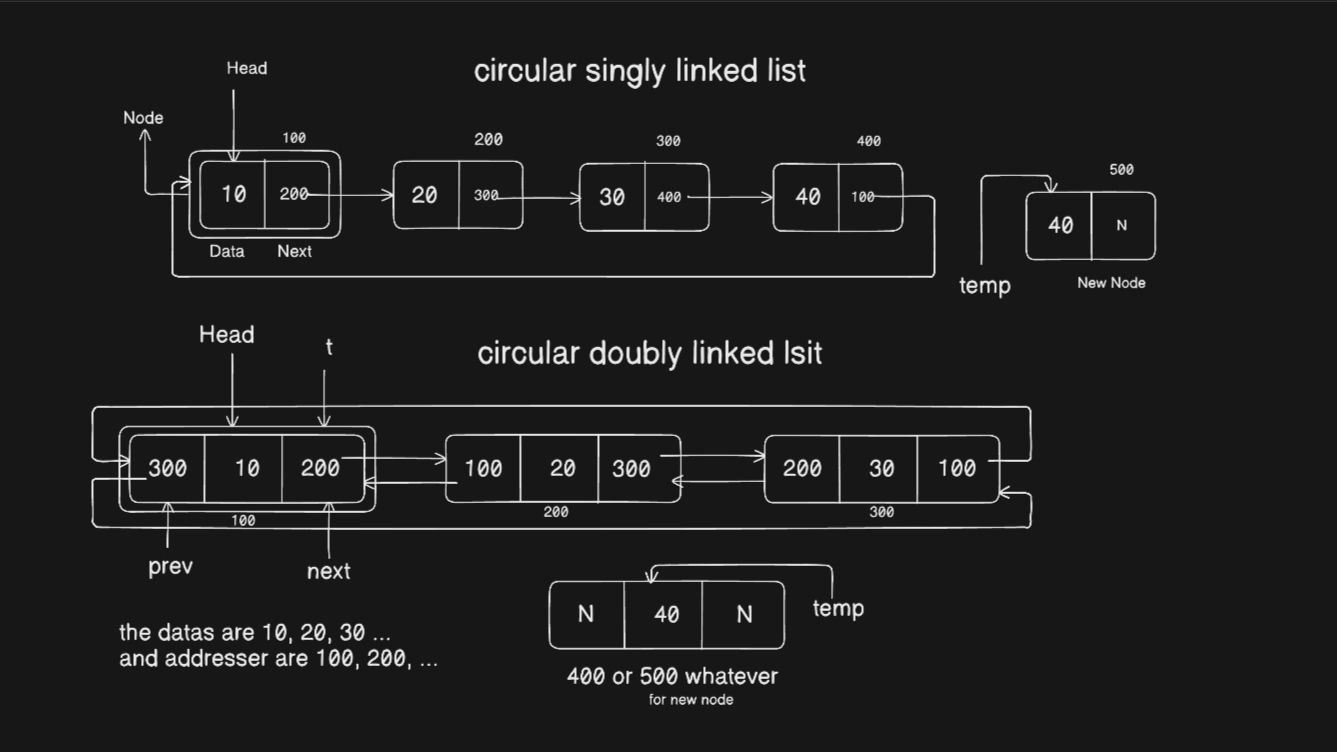
Circular Singly Linked List
Circular Doubly Linked List
In this article, I am gonna talk about the Doubly Linked List and implement it from scratch using Python.
The goal is not just to understand the theory, but also to understand how the next and prev references are manipulated during insertion and deletion.
What is a Doubly Linked List?
A Doubly Linked List (DLL) is a linked list where each node contains three things:
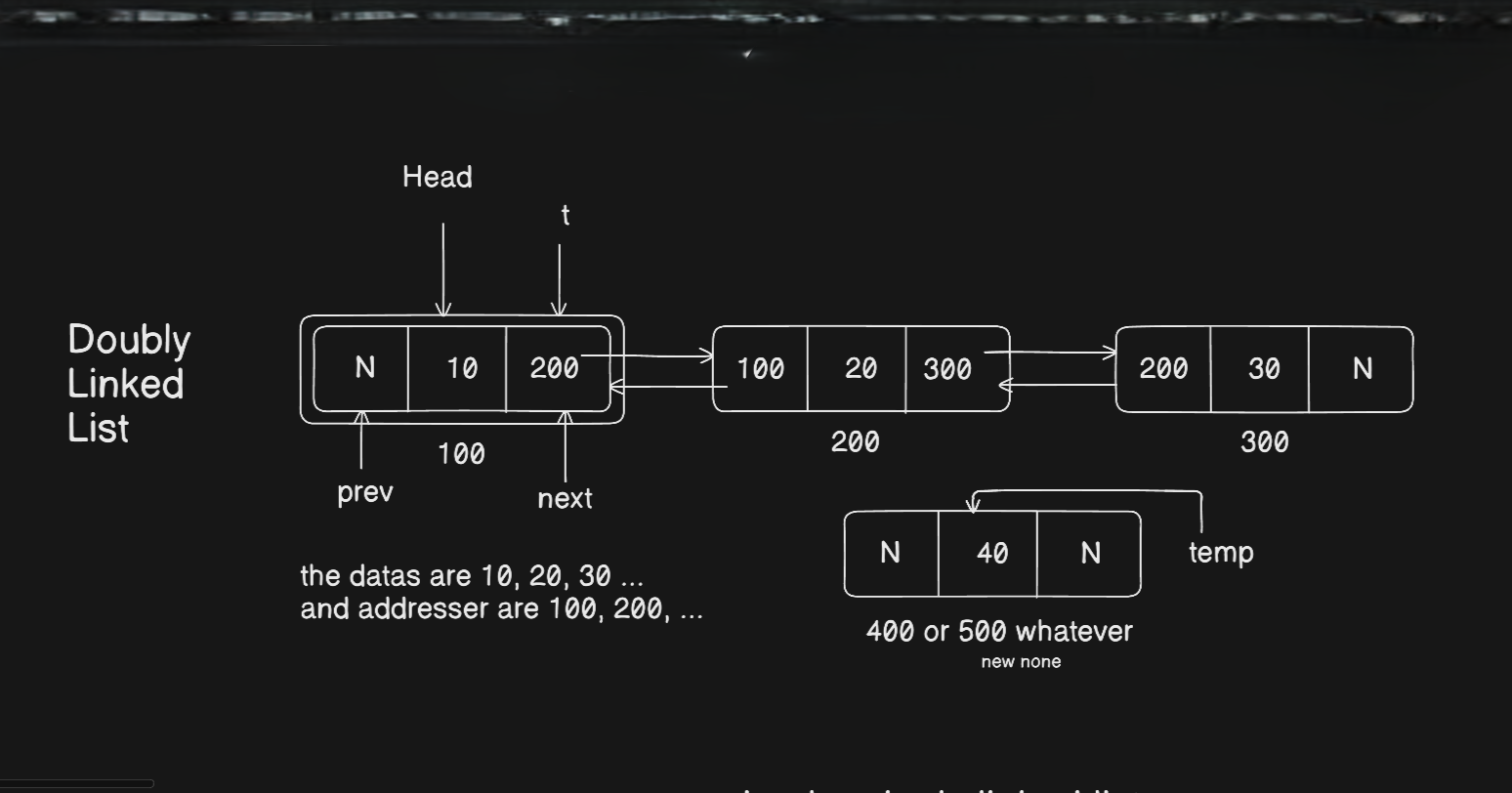
datastores the actual value.nextstores a reference to the next node.prevstores a reference to the previous node.
For example, a doubly linked list containing 10, 20, and 30 looks conceptually like this:
None <- 10 <-> 20 <-> 30 -> None
The first node's prev is None because there is no node before it.
Similarly, the last node's next is None because there is no node after it.
This is the major difference between a singly and doubly linked list.
In a singly linked list:
10 -> 20 -> 30 -> None
We can move only forward.
In a doubly linked list:
None <- 10 <-> 20 <-> 30 -> None
We can move both forward and backward.
Structure of a Node
Before creating the linked list, we need to create a Node class.
class Node:
    def __init__(self, value = None):
        self.data = value
        self.next = None
        self.prev = None
Each node initially contains:
data = value
next = None
prev = None
For example:
node = Node(10)
Conceptually:
+-------+------+------+
| None  |  10  | None |
+-------+------+------+
   prev   data   next
When this node is connected to another node, its next and prev references will be updated.
Creating the Doubly Linked List
Now we need a class that represents the complete linked list.
class DoublyLL:
    def __init__(self):
        self.head = None
The linked list has one important attribute:
self.head
head points to the first node of the linked list.
If the list is empty:
head -> None
After inserting 10:
head
 |
 v
 10
Inserting at the End
To insert a node at the end, we first create a new node.
def insertAtEnd(self, value):
    temp = Node(value)
If the linked list is empty:
if (self.head == None):
    self.head = temp
    return
The new node becomes the head.
If the list already contains nodes, we traverse until we reach the last node:
t = self.head
while(t.next != None):
    t = t.next
Once we reach the last node, we connect the new node:
t.next = temp
temp.prev = t
Suppose the list is:
None <- 10 <-> 20 <-> 30 -> None
and we insert 40.
After the operation:
None <- 10 <-> 20 <-> 30 <-> 40 -> None
Notice that two connections are created:
30.next -> 40
40.prev -> 30
Time Complexity
Since we traverse the list to find the last node:
Time: O(n)
Extra Space: O(1)
Inserting at the Beginning
Inserting at the beginning is more efficient because we already know where the first node is.
First, create a new node:
temp = Node(value)
If the list is empty:
if (self.head == None):
    self.head = temp
    return
Otherwise:
temp.next = self.head
self.head.prev = temp
self.head = temp
Suppose we have:
None <- 10 <-> 20 <-> 30 -> None
and insert 5.
The result becomes:
None <- 5 <-> 10 <-> 20 <-> 30 -> None
The important connections are:
5.next -> 10
10.prev -> 5
head -> 5
Time Complexity
Time: O(1)
Extra Space: O(1)
Inserting in the Middle
Our implementation inserts a new node after a node containing a specified value.
For example:
obj.insertAtMid(50, 20)
means:
Find the node containing
20and insert50after it.
Before:
10 <-> 20 <-> 30 <-> 40
After:
10 <-> 20 <-> 50 <-> 30 <-> 40
The method starts by creating a new node:
temp = Node(value)
t = self.head
Then it searches for the target node:
while(t != None):
    if(t.data == x):
Once the target is found, we need to update multiple links:
temp.next = t.next
The new node points forward to the node that originally came after t.
Then:
if(t.next != None):
    t.next.prev = temp
The next node's prev now points to the new node.
Then:
t.next = temp
temp.prev = t
Finally, t points forward to the new node and the new node points backward to t.
The complete operation maintains both directions:
Before:

20 <------> 30


After:

20 <------> 50 <------> 30
Why do we need four pointer updates?
Because a doubly linked list maintains links in both directions.
We need:
20.next -> 50
50.prev -> 20

50.next -> 30
30.prev -> 50
Missing even one of these connections can break the list.
Time Complexity
Searching for the target node takes:
O(n)
The actual insertion after finding the node takes:
O(1)
Therefore, the overall complexity is:
O(n)
Deleting a Node
Our deletionDll() method removes the first occurrence of a given value.
For example:
obj.deletionDll(50)
will search for 50 and remove it.
There are three important cases:
The list is empty.
The node to delete is the head.
The node is somewhere else in the list.
Case 1: Empty List
if(self.head == None):
    print("Linked List is empty")
    return
There is nothing to delete.
Case 2: Deleting the Head
Suppose:
None <- 10 <-> 20 <-> 30 -> None
We want to delete 10.
The new head should become 20.
if(t.data == value):
    self.head = t.next
Now we also need to make sure the new head does not point backward to the deleted node:
if (self.head != None):
    self.head.prev = None
The list becomes:
None <- 20 <-> 30 -> None
This is important because the first node must always have:
prev -> None
Case 3: Deleting a Node in the List
Suppose:
10 <-> 20 <-> 30 <-> 40
and we want to delete 20.
We need to connect 10 directly with 30.
The code does this:
t.prev.next = t.next
t.next.prev = t.prev
Conceptually:
Before:

10 <-> 20 <-> 30


After:

10 <--------> 30
The two important changes are:
10.next -> 30
30.prev -> 10
The node 20 is no longer connected to the main list.
Deleting the Last Node
Suppose:
10 <-> 20 <-> 30
and we delete 30.
The last node's previous node is 20.
The code eventually executes:
if (t.data == value):
    t.prev.next = None
Therefore:
10 <-> 20 -> None
The last node's next becomes None.
Traversing and Printing the List
The printDLL() method starts from the head:
t = self.head
Then it keeps moving forward:
while(t.next != None):
    print(t.data, end = " <--> ")
    t = t.next
When it reaches the final node, it prints:
print(t.data, end = " <--> None\n")
For example:
10 <--> 20 <--> 30 <--> None
Complete Implementation
Here is the complete implementation used in this article:
# Node Structure
class Node:
    def __init__(self, value = None):
        self.data = value
        self.next = None
        self.prev = None

# Doubly Linked List
class DoublyLL:
    def __init__(self):
        self.head = None

    # insertion at the end
    def insertAtEnd(self, value):
        temp = Node(value)
        # if the linked list is empty
        if (self.head == None):
            self.head = temp
            return
        t = self.head
        while(t.next != None):
            t = t.next
        t.next = temp
        temp.prev = t

    # insertion at the beginning
    def insertAtBeg(self, value):
        temp = Node(value)
        # check for empty list
        if (self.head == None):
            self.head = temp
            return
        temp.next = self.head
        self.head.prev = temp
        self.head = temp

    # Middle insertion
    def insertAtMid(self, value, x): # x is the positon
        temp = Node(value)
        t = self.head
        while(t != None): #can be t.next != None
            if(t.data == x):
                temp.next = t.next
                if(t.next != None):
                    t.next.prev = temp
                t.next = temp
                temp.prev = t
                return
            else:
                t = t.next

    # deletion of node
    def deletionDll(self, value):
        # if list is empty
        if(self.head == None):
            print("Linked List is empty")
            return
        t = self.head
        # if the first element is the target
        if(t.data == value):
            self.head = t.next
            # if the list contains only one node
            if (self.head != None):
                self.head.prev = None
            return
        while(t.next != None):
            if (t.data == value):
                t.prev.next = t.next
                t.next.prev = t.prev
                return
            else:
                t = t.next
        if (t.data == value):
            t.prev.next = None

    # traversing and printing the list
    def printDLL(self):
            if(self.head == None):
                print("Linked List is empty")
                return
            t = self.head
            while(t.next != None):
                print(t.data, end = " <--> ")
                t = t.next
            print(t.data, end = " <--> None\n")

# Some Test Cases that you can try
obj = DoublyLL()
obj.printDLL()

obj.insertAtEnd(10)
obj.insertAtEnd(20)
obj.insertAtEnd(30)
obj.insertAtEnd(40)
obj.printDLL()

obj.insertAtBeg(5)
obj.printDLL()

obj.insertAtMid(50, 20)
obj.printDLL()

obj.deletionDll(5)
obj.printDLL()

obj.deletionDll(50)
obj.printDLL()

obj.deletionDll(40)
obj.printDLL()
Output
The testing section performs the following operations:
Creates an empty doubly linked list.
Prints the empty list.
Inserts
10,20,30, and40at the end.Inserts
5at the beginning.Inserts
50after20.Deletes
5.Deletes
50.Deletes
40.
The resulting output will be similar to:
Linked List is empty
10 <--> 20 <--> 30 <--> 40 <--> None
5 <--> 10 <--> 20 <--> 30 <--> 40 <--> None
5 <--> 10 <--> 20 <--> 50 <--> 30 <--> 40 <--> None
10 <--> 20 <--> 50 <--> 30 <--> 40 <--> None
10 <--> 20 <--> 30 <--> 40 <--> None
10 <--> 20 <--> 30 <--> None
Time Complexity of Operations
The time complexity depends on whether we need to traverse the list.
| Operation | Time Complexity | Extra Space |
|---|---|---|
| Insert at beginning | O(1) | O(1) |
| Insert at end | O(n) | O(1) |
| Insert after a value | O(n) | O(1) |
| Delete head | O(1) | O(1) |
| Delete a value | O(n) | O(1) |
| Traverse/Print | O(n) | O(1) |
One important point is that although a doubly linked list allows movement in both directions, it does not automatically make searching O(1).
If we only have a head pointer and want to find a particular value, we still have to traverse the list.
Advantages of a Doubly Linked List
1. Traversal in Both Directions
A singly linked list only provides:
next
A doubly linked list provides:
prev <-> next
Therefore, we can traverse forward and backward.
2. Easier Deletion
When we have a reference to a node, its previous node can be accessed directly using:
node.prev
This makes removing a node easier because we don't necessarily need to search for its previous node.
3. Useful for Many Real-World Data Structures
Doubly linked lists are commonly useful when we need movement in both directions, such as navigation between previous and next items.
Disadvantages of a Doubly Linked List
1. Extra Memory
Every node stores an additional prev reference.
A singly linked list:
[data | next]
A doubly linked list:
[prev | data | next]
Therefore, a doubly linked list requires more memory per node.
2. More Pointer Management
Whenever we insert or delete a node, we have to maintain both:
next
prev
This means there are more opportunities to make mistakes.
For example, while inserting a node between two nodes, several links must be updated correctly.
Singly vs Doubly Linked List
| Feature | Singly Linked List | Doubly Linked List |
|---|---|---|
| Data | Yes | Yes |
next reference |
Yes | Yes |
prev reference |
No | Yes |
| Forward traversal | Yes | Yes |
| Backward traversal | No | Yes |
| Memory per node | Lower | Higher |
| Pointer management | Simpler | More complex |
Conceptually:
Singly:

10 -> 20 -> 30 -> None


Doubly:

None <- 10 <-> 20 <-> 30 -> None
Important Points to Remember
When implementing a doubly linked list, always remember that the links work in both directions.
If we have:
A <-> B <-> C
then:
A.next = B
B.prev = A

B.next = C
C.prev = B
When inserting a node between B and C:
A <-> B <-> X <-> C
we need to correctly update all relevant references.
When deleting B:
A <-> C
we need:
A.next = C
C.prev = A
Thinking about the links this way makes linked-list problems much easier to understand.
Conclusion
A doubly linked list is an extension of the singly linked list where every node maintains references to both the next and previous nodes.
The most important thing to learn from implementing a doubly linked list is not memorizing the code. It is understanding how the references change when a node is inserted or deleted.
The basic structure is:
None <- Node <-> Node <-> Node -> None
Once the pointer manipulation becomes comfortable, circular linked lists and more advanced linked-list problems become much easier to understand.
This implementation covers the fundamental operations:
Creating nodes
Inserting at the beginning
Inserting at the end
Inserting after a particular value
Deleting a node
Traversing the list
These are the building blocks for solving more advanced DSA problems involving linked lists.